How Our AI Technology Works
We don't just throw your documents at a language model and hope for the best. Ask360 uses a multi-stage retrieval pipeline, multi-signal confidence scoring, and real-time guardrails to deliver answers you can trust.
The Retrieval Pipeline
Six stages transform a visitor's question into a grounded, cited answer
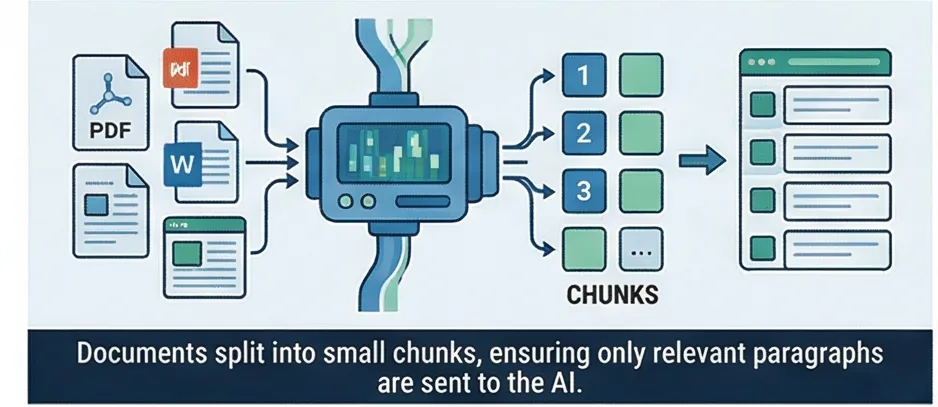
Document Ingestion
Your documents (PDFs, Word files, spreadsheets, web pages) are split into small passages called "chunks," roughly a paragraph each. This ensures the AI retrieves only the relevant parts when someone asks a question, not the entire document.
Why split documents into chunks? Because when someone asks "What's the return policy?", you don't want to send the entire 50-page handbook to the AI. You want to send the 2-3 paragraphs that actually discuss returns. Smaller, focused passages produce better answers and cost fewer tokens.
How chunking works
- Target chunk size: ~400 characters (roughly one paragraph)
- Sliding window with overlap ensures sentences aren't cut mid-thought
- Supported formats: PDF (text-based), DOCX, XLSX (each sheet becomes a section), HTML, plain text
- URL import: paste a web page URL and the system extracts the content automatically
- Max file size: 10 MB per document
Text extraction uses dedicated libraries for each format (smalot/pdfparser for PDFs, PhpSpreadsheet for Excel, Html2Text for web pages), ensuring clean text regardless of the source format.
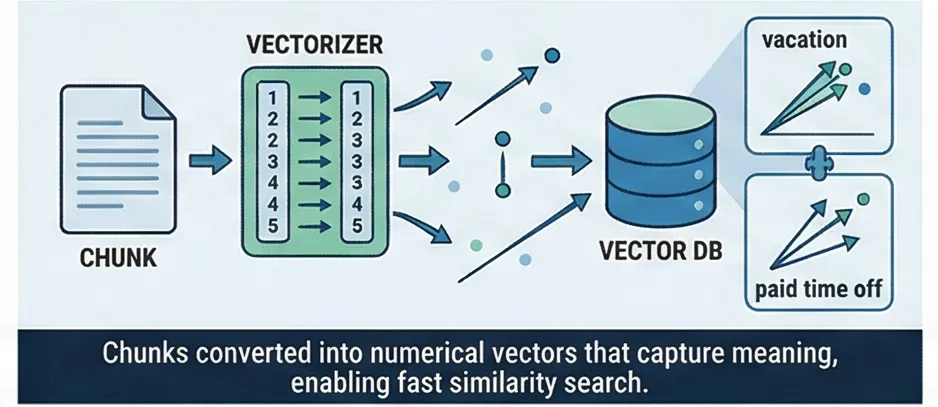
Embedding
Each chunk is converted into a vector, a list of numbers that captures the meaning of the text. "Vacation" and "paid time off" produce similar vectors because they mean similar things, even though the words are completely different.
Embeddings are the mathematical representations that power semantic search. The quality of your embeddings directly determines how well the AI understands your documents and questions.
Matryoshka Embeddings
Like Russian nesting dolls, the most important information is encoded in the first dimensions. This allows compact 256-dimensional vectors that maintain quality comparable to larger representations, while using less storage and enabling faster search.
Asymmetric Encoding
Questions and documents are processed differently because they serve different roles. A question like "What is the PTO policy?" is short and interrogative, while the matching document passage is descriptive and detailed. Asymmetric encoding handles each appropriately, significantly improving retrieval accuracy compared to treating both the same way.
Multi-Provider Support
Choose the embedding provider that fits your needs. Gemini API (fast, low cost) is the default. OpenAI and local ONNX models are also supported. Providers are configurable per project, so you can switch without re-architecting. All providers output 256-dimensional vectors for compatibility.
- Vectors stored in PostgreSQL with pgvector extension
- HNSW indexes for fast approximate nearest neighbor search
- Trigram indexes for fuzzy substring matching
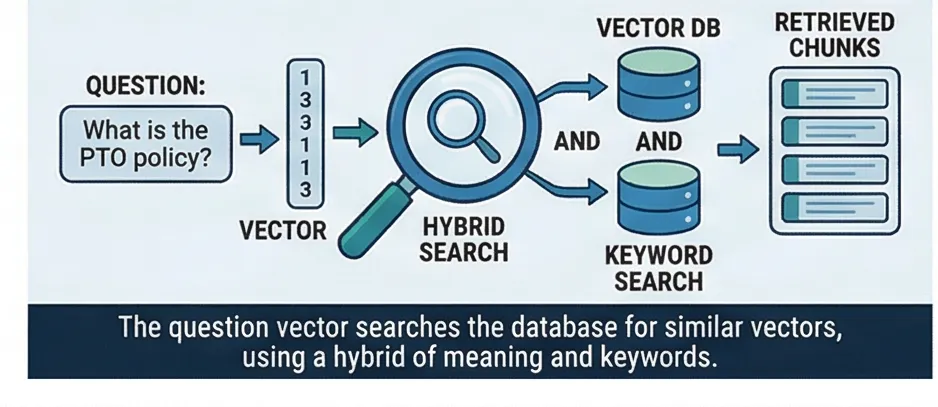
Hybrid Search
When a visitor asks a question, two complementary searches run in parallel. Semantic search understands meaning. Keyword search catches exact terms. Results are fused using Reciprocal Rank Fusion so neither signal dominates.
Semantic Search
Understands the meaning of the question. "What's our vacation policy?" matches a document about "PTO and time-off guidelines" even though the words don't overlap. This is powered by the same vector embeddings used during ingestion: the question is embedded and compared against all stored chunk vectors.
Keyword Search
Catches exact terms that matter: product names, policy numbers, acronyms, proper nouns. A semantic search might miss "HIPAA compliance" because it focuses on health-related meaning broadly, but keyword search finds the exact term in the right document.
Reciprocal Rank Fusion (RRF)
Instead of trying to add scores from two different scales (a common anti-pattern that requires fragile weight tuning), RRF combines results based purely on rank position. A document appearing in both search results naturally scores higher than one appearing in only one. The k=60 constant from the original research paper dampens the effect of high-ranked outliers.
- Vector search: cosine similarity via pgvector HNSW index (~2ms)
- Keyword search: PostgreSQL
ts_rank_cdwith GIN tsvector index (~2-34ms) - Both run in parallel; RRF fusion takes <1ms
- 12 candidates per search leg, ~20 unique candidates after fusion
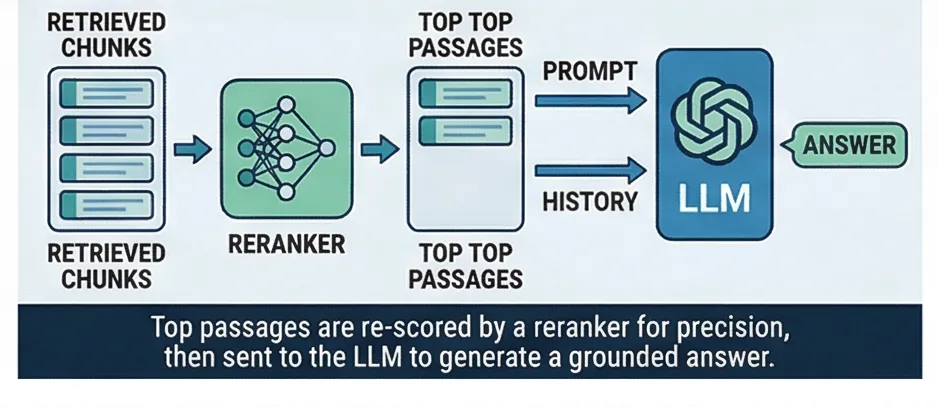
Cross-Encoder Reranking
The initial search casts a wide net. The reranker narrows it. A specialized neural model reads each candidate passage together with the question as a single input, scoring how directly it answers what was asked. This is fundamentally more accurate than comparing representations separately.
The difference from the initial search is fundamental. In stage 3, the question and passages are encoded separately and compared by vector distance. The cross-encoder reads them together, attending to word-level interactions. It knows that "How many PTO days do new employees get?" is better answered by a passage stating "New hires receive 10 days" than by a passage about "PTO policy overview," even if the overview passage has higher vector similarity.
Context Expansion
Documents are split into small chunks for search accuracy, but the AI needs fuller context to give good answers. After reranking selects the top passages, we retrieve the neighboring chunk on each side. This ensures the AI sees complete paragraphs and surrounding context, not just isolated fragments. The answer reads naturally because the AI has the full picture.
- Model:
ms-marco-MiniLM-L-6-v2(33M parameters, ~80MB, runs locally via ONNX) - ~6ms per passage, ~30ms for top 5 candidates
- Distributed across PM2 cluster instances for parallel scoring
- Adds 33-40% accuracy improvement over retrieval alone
- Neighbor expansion: 1 chunk on each side, one SQL query (~2ms)
LLM Generation
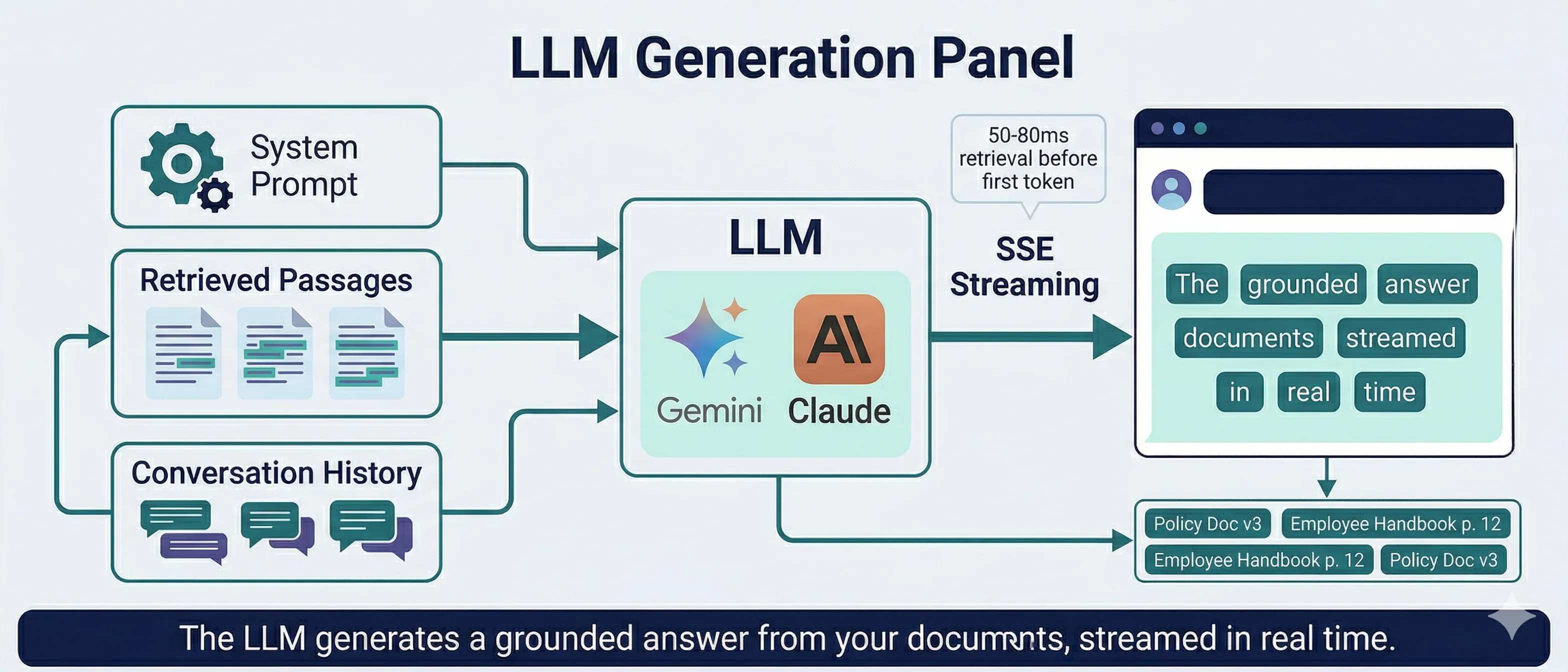
The top passages, your system prompt, and conversation history are sent to the LLM. The response streams back in real time. The AI is instructed to answer only from the provided context and to be honest when it doesn't have enough information.
The LLM receives a carefully constructed prompt: your custom system prompt (which defines the AI's personality and scope), the retrieved document passages with source metadata, and the conversation history for multi-turn context. Responses stream via Server-Sent Events so visitors see tokens appear in real time.
Response Detail Levels
Each project can be configured with a response detail level that controls how thoroughly the AI answers:
- Concise: Short, direct answers. Best for FAQ bots and simple lookups.
- Standard: Balanced answers covering key points. General-purpose default.
- Comprehensive: Covers all relevant details including criteria, examples, and exceptions. Best for policy docs, legal, and compliance.
- Primary provider: Gemini (Flash for standard tier, Pro for premium)
- Automatic failover to Claude if primary fails (see Provider Resilience below)
- Total retrieval pipeline: 50-80ms before first LLM token
Multi-Signal Confidence Scoring
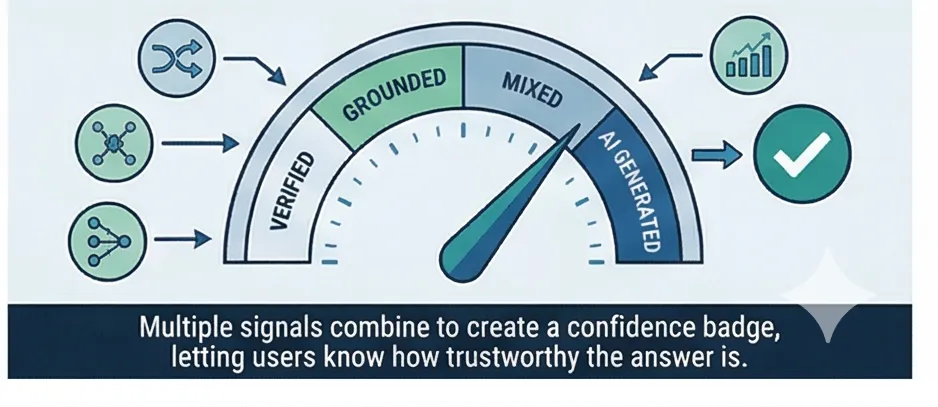
Every response includes a confidence badge calculated from multiple independent signals. This tells visitors how well the answer is supported by your documents, not just whether the AI sounds confident.
Cross-Encoder Relevance
Measures how directly the retrieved passages answer the specific question.
Vector Similarity
Measures topical alignment between the question and matching documents.
Why multiple signals? Because a single metric can be misleading. A factoid question like "How many PTO days do employees get?" scores high on the cross-encoder (it finds a passage that directly states the number). But a topical question like "What is the vacation policy?" scores near zero on the cross-encoder because there's no single-sentence answer, even though the right documents were retrieved.
By combining both signals, we avoid this blind spot. Either signal can promote the confidence tier. The cross-encoder catches factoid matches. Vector similarity catches topical alignment. Together they cover both question types accurately.
- Display score: the higher of the two signals, mapped to a user-friendly percentage
- Source citations show which documents were used, with document names and excerpts
- Visitors can verify answers by checking the cited sources
Platform Features
Built-in resilience, safety, caching, and conversation support
Provider Resilience
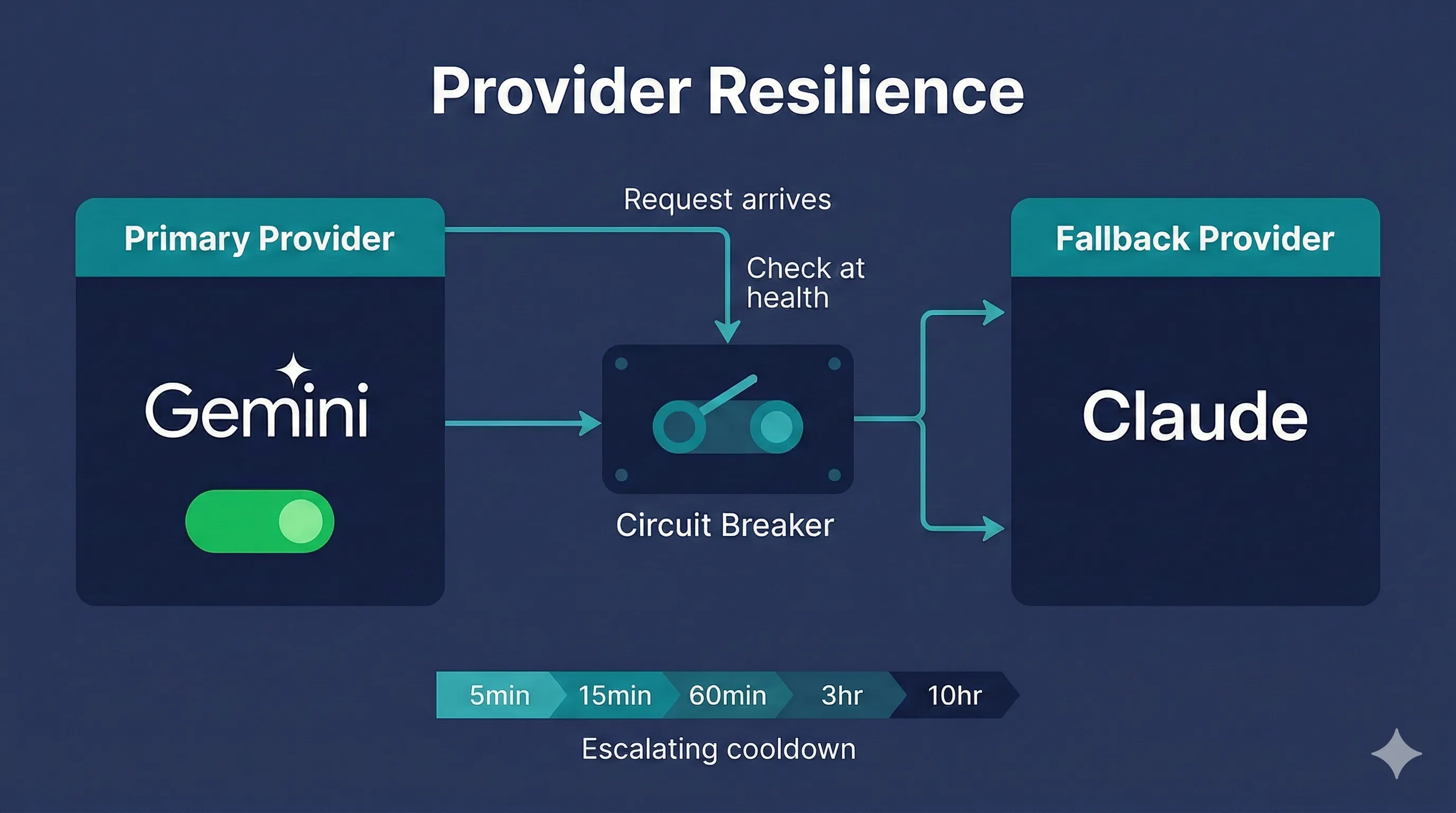
Your portal stays online even when individual AI providers have issues. When a provider starts failing, the circuit breaker detects it and routes requests to an alternative. Once the primary recovers, traffic shifts back. Your users never see an error page.
Circuit Breaker
When a provider starts failing or slowing down, the circuit breaker detects the degradation and automatically routes requests to an alternative provider. The state machine transitions through CLOSED (normal operation) to OPEN (primary skipped) to HALF_OPEN (test probe sent) and back to CLOSED once the primary recovers.
Escalating Cooldown
Instead of a fixed retry interval, the cooldown escalates with each consecutive failure: 5 minutes, then 15, then 60, then 3 hours, then 10 hours. Brief hiccups recover quickly. Extended outages don't waste requests probing a dead provider.
Adaptive Throttling
Instead of hitting rate limits and failing, the system monitors provider feedback in real time and adjusts request rates proactively. When a provider signals pressure (429 responses), request pacing slows automatically. When headroom returns, throughput increases. No manual tuning required.
Stale Recovery
If a document embedding operation fails or gets interrupted mid-process, the system automatically detects the stale state and retries without manual intervention. A cron job checks every 5 minutes for documents stuck in "processing" beyond the expected threshold and resets them for retry.
- 2 consecutive failures trigger the circuit breaker
- Network errors (ETIMEDOUT, ECONNRESET) detected via exception cause-chain walking
- Retry with exponential backoff (3 attempts per provider) before failover
- Stale threshold: 5 min for API providers, 30 min for local ONNX
Streaming-Compatible Guardrails
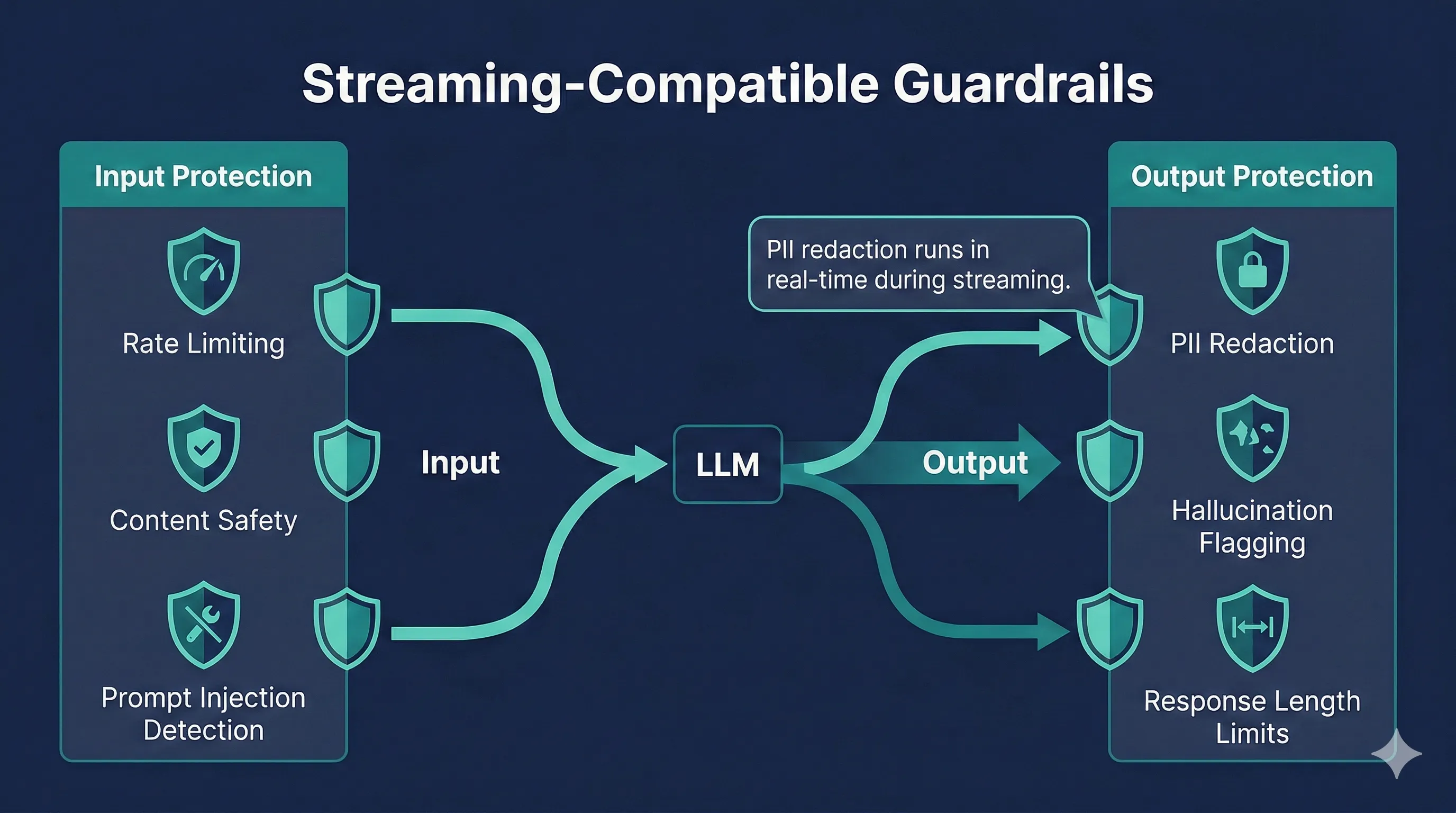
Safety runs in both directions. Input protection catches problems before they reach the AI. Output protection catches problems in the response. PII redaction runs in real time as content streams, so sensitive data never reaches the visitor's browser.
Input Protection
- Content safety filter detects and blocks offensive or harmful queries before they reach the LLM
- Prompt injection detection prevents attempts to override your system prompt with adversarial inputs
- Rate limiting per IP and per project prevents abuse with configurable per-minute limits
Output Protection
- PII redaction scans for social security numbers, credit card numbers, and phone numbers as tokens stream, redacting them before they reach the browser
- Hallucination flagging via confidence badges warns visitors when document support is weak, rather than presenting uncertain answers as fact
- Response length limits prevent runaway generation that could produce excessively long or repetitive responses
PII redaction is the only guardrail that runs during streaming (on each chunk). Hallucination flagging and length checking evaluate the complete response to ensure accuracy. This design balances real-time protection with assessment quality.
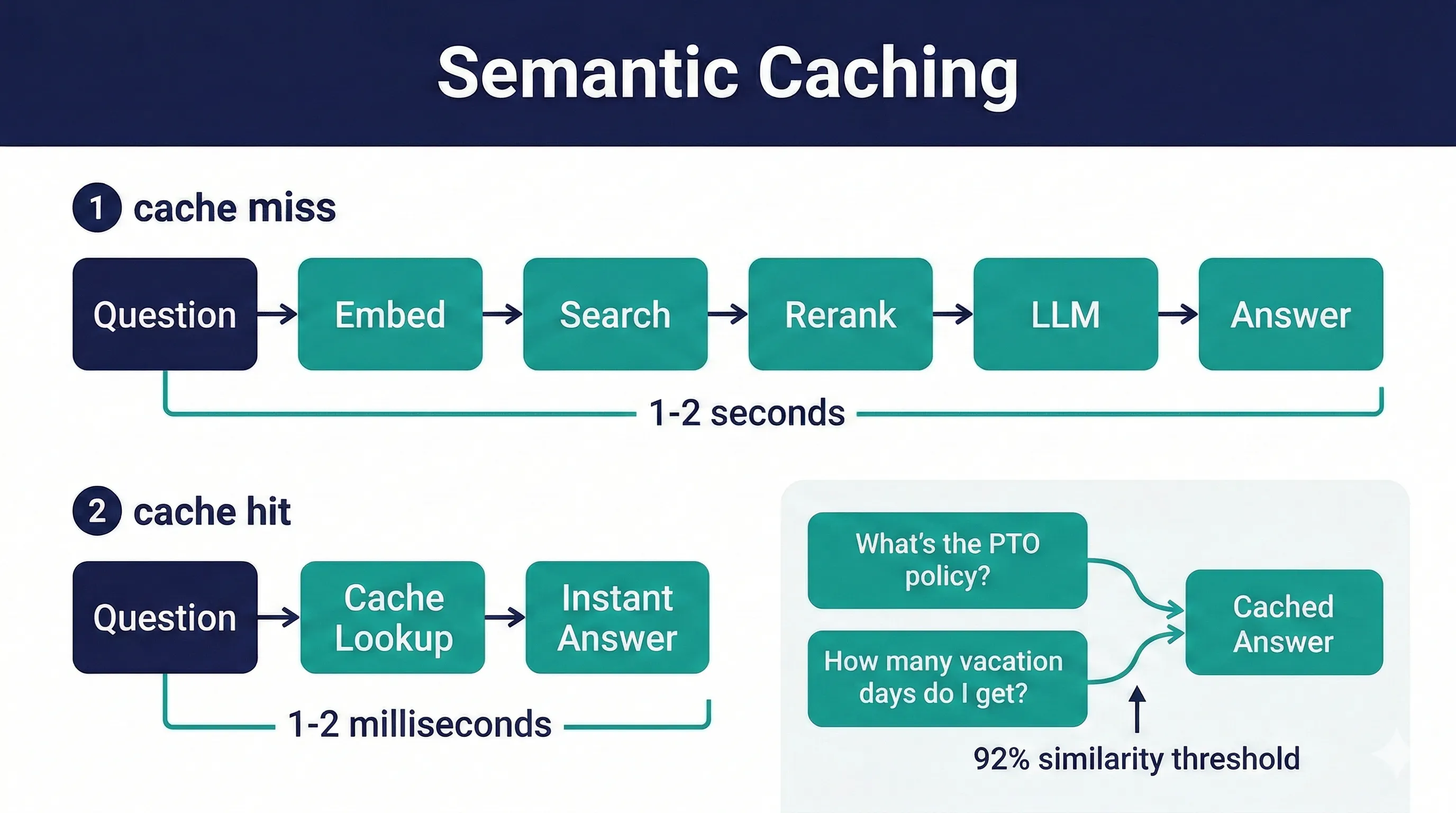
Semantic Caching
When a visitor asks a question very similar to one that's been asked before, the cached answer returns instantly. No retrieval, no LLM call, no wait. The cache matches by meaning, not exact wording, so "What's the PTO policy?" and "How many vacation days do I get?" can hit the same cache entry.
The cache compares the question's vector embedding against stored question embeddings. If similarity exceeds 92%, the cached response is returned with the same confidence tier and sources. This skips the entire retrieval and LLM pipeline.
- Cache hit latency: 1-2ms vs full pipeline: 1-2 seconds
- Per-project cache, automatically cleared when documents are added or removed
- Multi-turn conversations skip the cache because follow-up questions depend on prior context
- Cached responses stream in chunks to maintain a natural feel, matching the live streaming experience
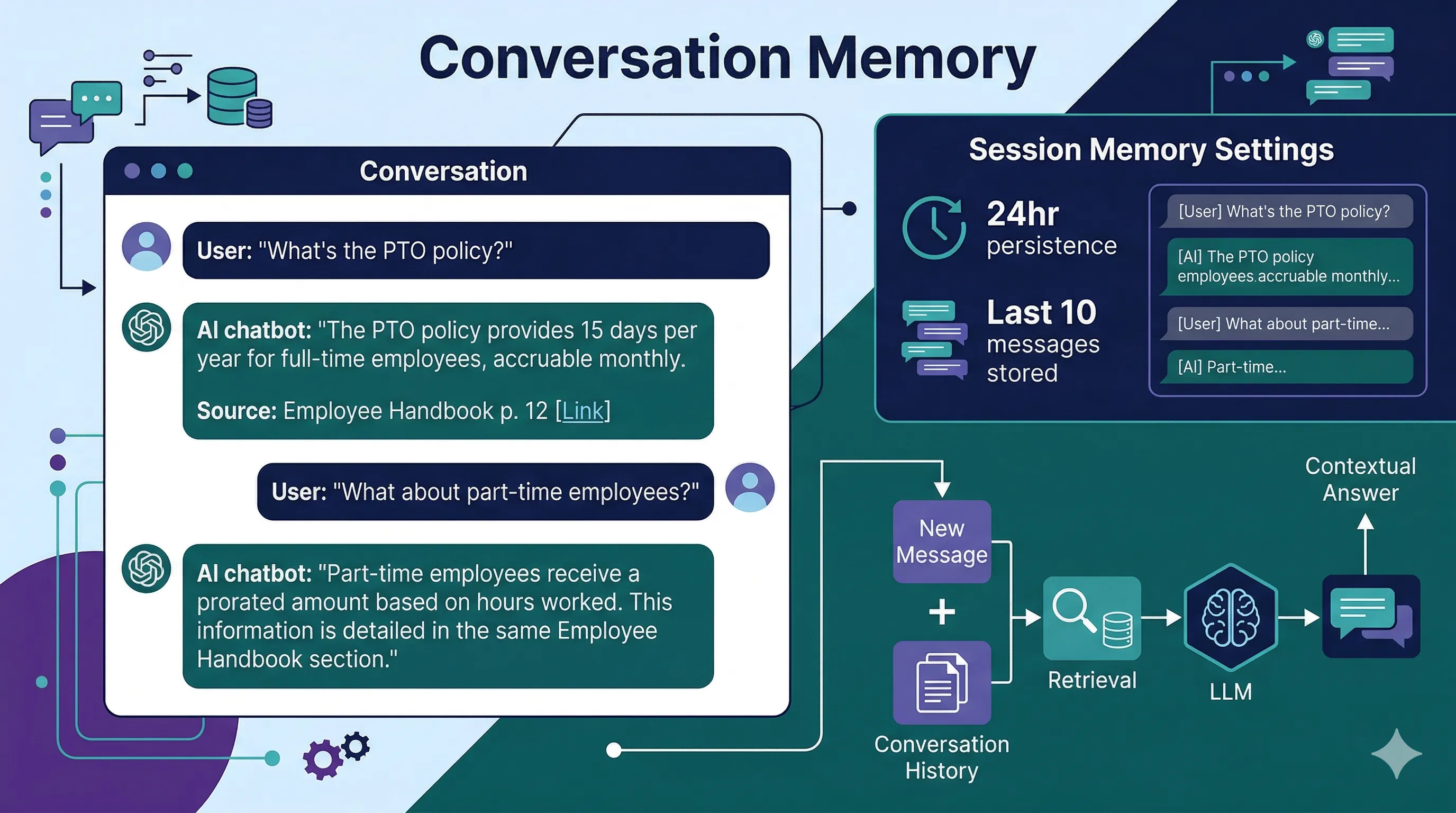
Conversation Memory
Visitors can ask follow-up questions naturally. The AI remembers what was discussed earlier in the conversation and uses that context to give better answers. "What about part-time employees?" works without restating the original question.
Each chat request includes the conversation history so the LLM has full context for follow-up questions. Retrieval runs on the new message only (not the full history), keeping search focused and fast while the LLM handles conversational context.
- Last 10 messages sent with each request for conversational context
- Widget mode persists conversations in the visitor's browser (localStorage) for 24 hours
- Visitors can close the chat, browse your site, and come back to continue where they left off
- Full-page chat mode starts fresh each visit (no localStorage persistence)
New to RAG? Start here.
Our explainer covers what RAG is, how it compares to fine-tuning, common misconceptions, and what to look for in a production RAG system.
Read: RAG ExplainedSee It in Action
Try a live demo to experience the search quality, confidence scoring, and source citations for yourself.